Skip to content
Now on the Chrome Web Store · v2.0

Read any webpage.
Actually understand it.

Highlight any word or sentence to get a context-aware translation, grammar breakdown, furigana for Japanese, and natural pronunciation — without leaving the page.

  • Free & open source
  • 14 languages
  • Gemini & DeepSeek
  • No interruptions
nytimes.com / article

The exhibition's curators argue that the modern ephemeral nature of digital art forces a re-evaluation of what permanence means in creative work.

Some critics, however, have suggested that this framing flattens decades of conceptual practice into a marketable narrative.

Built for learners studying

🇯🇵 日本語 🇬🇧 English 🇨🇳 中文 🇰🇷 한국어 🇪🇸 Español 🇫🇷 Français 🇩🇪 Deutsch 🇮🇹 Italiano 🇵🇹 Português 🇷🇺 Русский 🇸🇦 العربية 🇮🇳 हिन्दी 🇻🇳 Tiếng Việt 🇹🇭 ไทย 🇯🇵 日本語 🇬🇧 English 🇨🇳 中文 🇰🇷 한국어 🇪🇸 Español 🇫🇷 Français 🇩🇪 Deutsch 🇮🇹 Italiano 🇵🇹 Português 🇷🇺 Русский 🇸🇦 العربية 🇮🇳 हिन्दी 🇻🇳 Tiếng Việt 🇹🇭 ไทย

Features

More than a translator. A study card on every page.

LingoContext reads the sentence around your selection, so it knows whether crane is the bird, the construction vehicle, or a Japanese fold. Then it explains why.

Context-aware analysis

Reads the surrounding sentence and page so meanings fit the actual passage — not the dictionary default.

Adaptive depth

Short selections get word-by-word grammar breakdowns. Long passages get a clean contextual summary.

Japanese furigana

Local kuromoji tokenization renders furigana on kanji in under 300 ms — long before AI even responds.

Neural pronunciation

Edge Neural voices in 14 languages, with the Web Speech API as automatic fallback. Optional autoplay.

Streaming responses

Server-sent events stream the analysis in. The first words land in the popup almost instantly.

Multi-provider AI

Switch between Gemini and DeepSeek from the dashboard. Same prompt schema, your choice of speed vs depth.

Vocabulary dashboard

Save words as you read. Search across meanings, filter by language, and track an activity heatmap.

Triple-layer caching

AI analysis, TTS audio, and quick definitions are all cached, so common lookups feel instant.

Stays out of the way

Draggable, pinnable, resizable popup with shadow-DOM isolation — never breaks the page you're reading.

How it works

Three clicks from "what's this?" to "got it."

  1. 1

    Highlight any text

    Select on Wikipedia, NYT, a Japanese novel, a Twitter post — anywhere. A little paw icon appears next to your selection.

  2. 2

    Click the paw

    A draggable popup appears with quick definition, full translation, and grammar — streamed in as it's generated.

  3. 3

    Listen, save, move on

    Tap Listen for neural pronunciation, Save to add it to your vocabulary list, then keep reading.

Showcase

See it work on real pages.

From a Japanese essay to an English think-piece — the popup adapts to the language and the length of what you select.

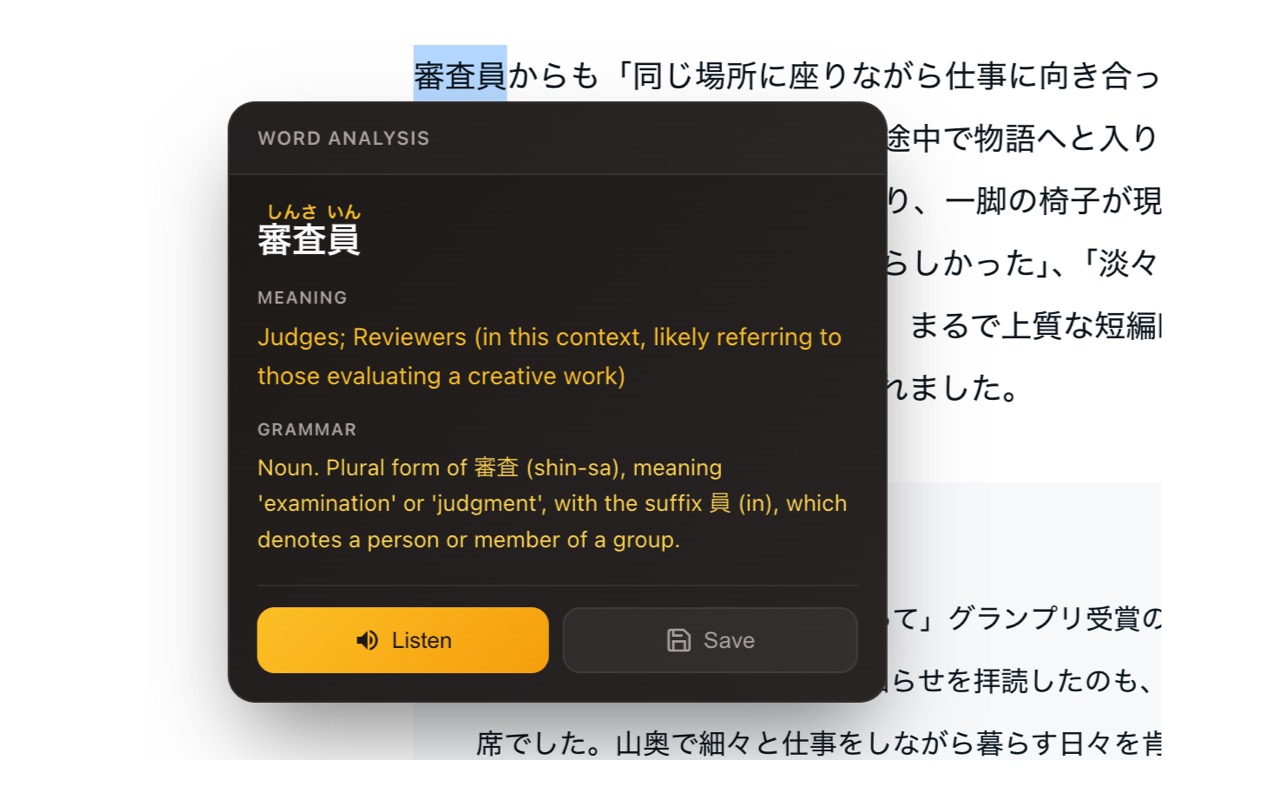
LingoContext popup analyzing the Japanese word 審査員 with furigana, meaning, and grammar breakdown
審査員 — single-word analysis with auto-generated furigana
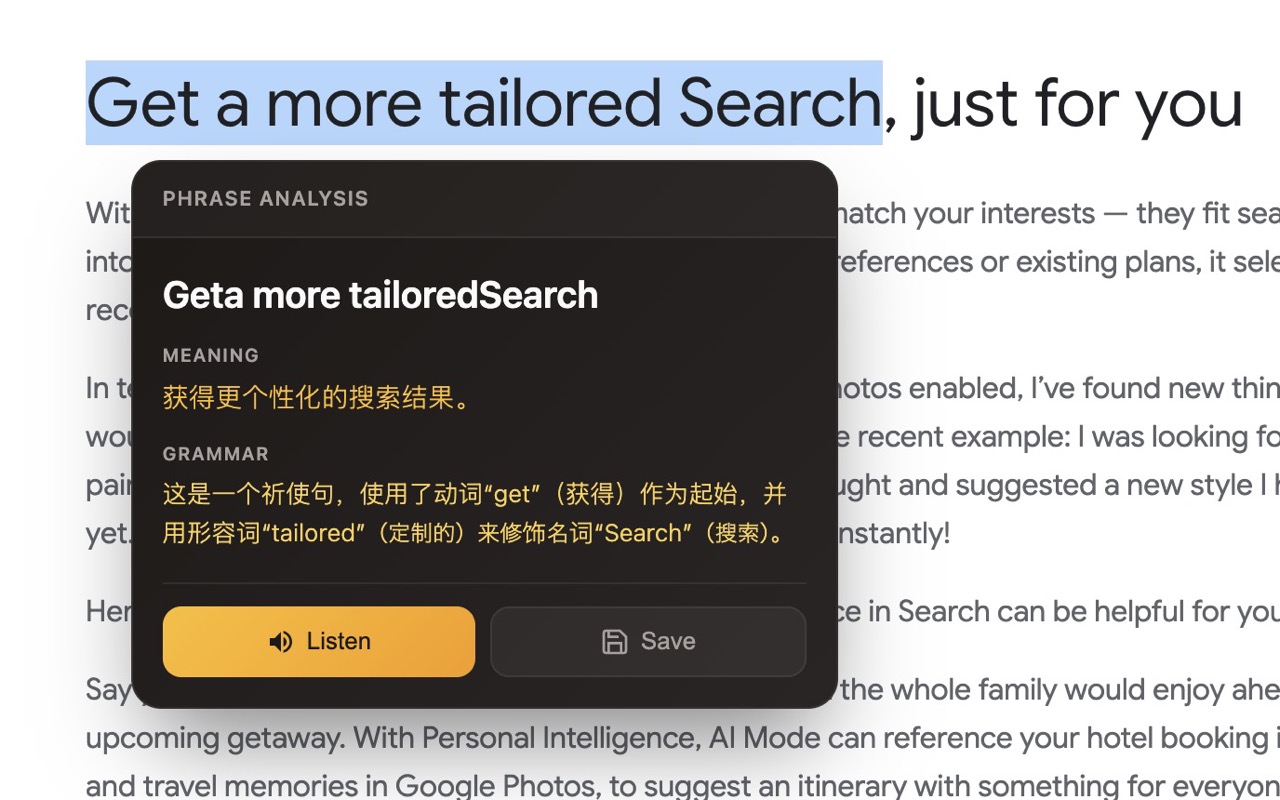
LingoContext popup translating an English phrase into Chinese with grammar notes
English → Simplified Chinese with grammar notes
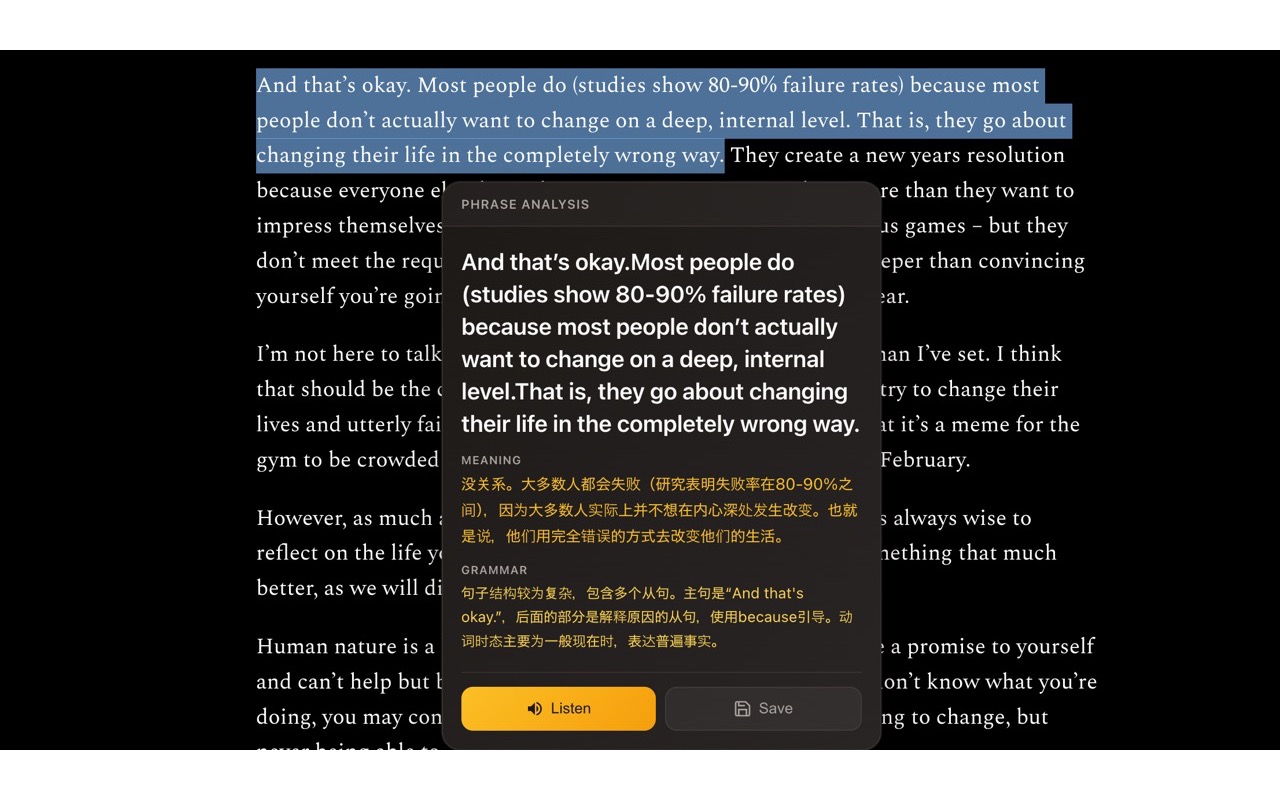
A long passage selected on a webpage, with LingoContext providing a contextual Chinese summary and grammar explanation
Long passages get a contextual summary, not just translation
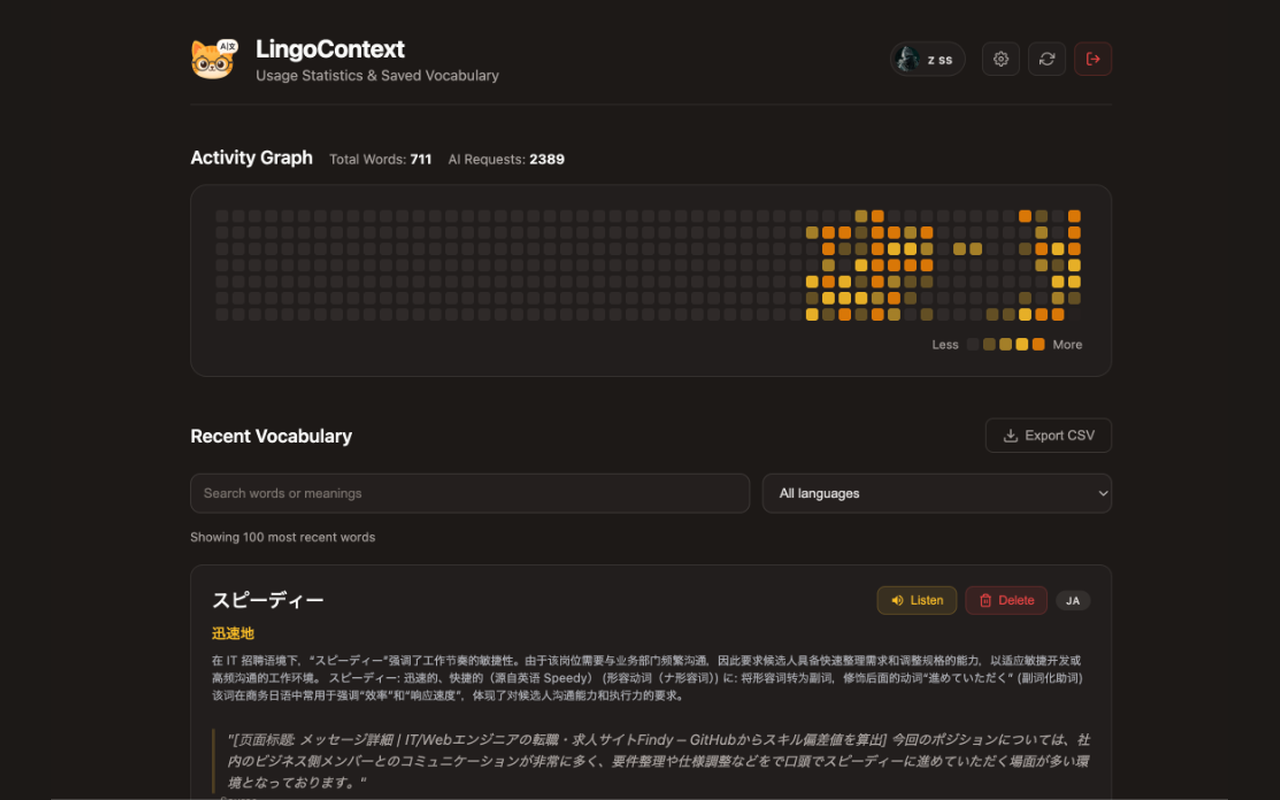
The LingoContext dashboard showing an activity heatmap and a list of saved vocabulary with search and language filters
Vocabulary dashboard with an activity heatmap, search, and language filters
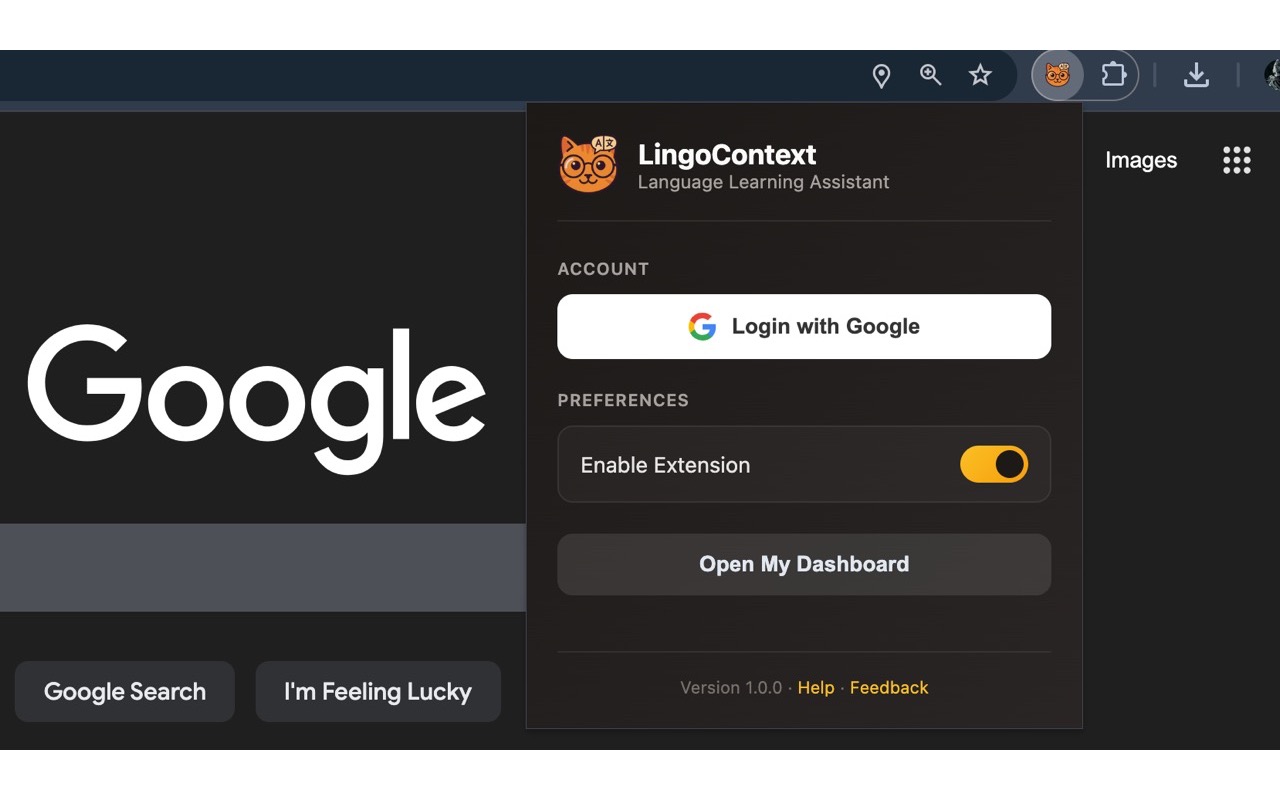
The LingoContext browser-action popup showing the Google login, an enable toggle, and a button to open the dashboard
The toolbar popup — sign in with Google, toggle the extension, open the dashboard

Built for Japanese learners

本気ほんき for kanji.

LingoContext bundles a real Japanese tokenizer in the backend, not a wrapper around the dictionary. Furigana is aligned per-kanji and rendered before the AI even finishes thinking.

  • Per-kanji <ruby> alignment via kuromoji
  • Auto-filters redundant kana-on-kana annotations
  • Word-by-word grammar: tells you why べてる is the te-form of べる
  • Natural ja-JP-NanamiNeural pronunciation

Under the hood

Modern, open, self-hostable.

A Manifest V3 extension, an Express backend, and a pluggable AI layer — all open source.

Extension

Manifest V3

Styling

Tailwind CSS

Server

Node + Express

Streaming

SSE

AI

Gemini · DeepSeek

JP

kuromoji

FAQ

Common questions.

Is it really free?

Yes. The extension is free on the Chrome Web Store and the entire stack is MIT-licensed. If you want to bring your own API key or self-host the backend with Docker Compose, you can.

Which languages does it support?

Source text can be any language Gemini or DeepSeek understands. Target explanations work in 14 languages including English, 日本語, 简体中文, 繁體中文, Español, Français, Deutsch, 한국어, Português, Русский, العربية, हिन्दी, Tiếng Việt, and ไทย.

Does it work on Safari or Firefox?

Right now LingoContext is a Chrome / Chromium extension (Edge, Brave, Arc, Vivaldi all work). Safari and Firefox ports are on the roadmap — star the repo to follow along.

What about my data?

Only your selection and a short context window are sent to the AI provider you choose. Saved vocabulary lives in your account on the LingoContext server. If you self-host, nothing leaves your machine.

Can I use my own AI key?

Yes — self-host the backend with Docker Compose, drop your Gemini or DeepSeek key in server/.env, and point the extension's BACKEND_URL at your instance.

Stop tab-switching. Start understanding.

Install LingoContext and turn every webpage you read into a study session.